Sensors
Cisco XDR provides visibility and advanced threat detection for on-premises networks. For on-premises networks, a Cisco Secure private network monitoring virtual appliance is needed to collect network flow data and send it to the cloud. The virtual appliance is available as an ISO, which contains the necessary Cisco XDR packages as part of an Ubuntu Linux image. The virtual appliance software is included in the Cisco XDR service; users can download the sensor ISO directly from their customer portal. This topic covers additional options for installing and configuring the virtual appliance.
The sensor collects local network data telemetry, such as NetFlow, and sends it securely to the cloud.
Choose Administration > On-Premises Appliances in the navigation menu and click the Sensors tab to view and configure sensors. Ensure that you have deployed your sensors to monitor your on-premises network prior to verifying and configuring your sensor settings in the Sensors tab. For details, see Install Sensors.
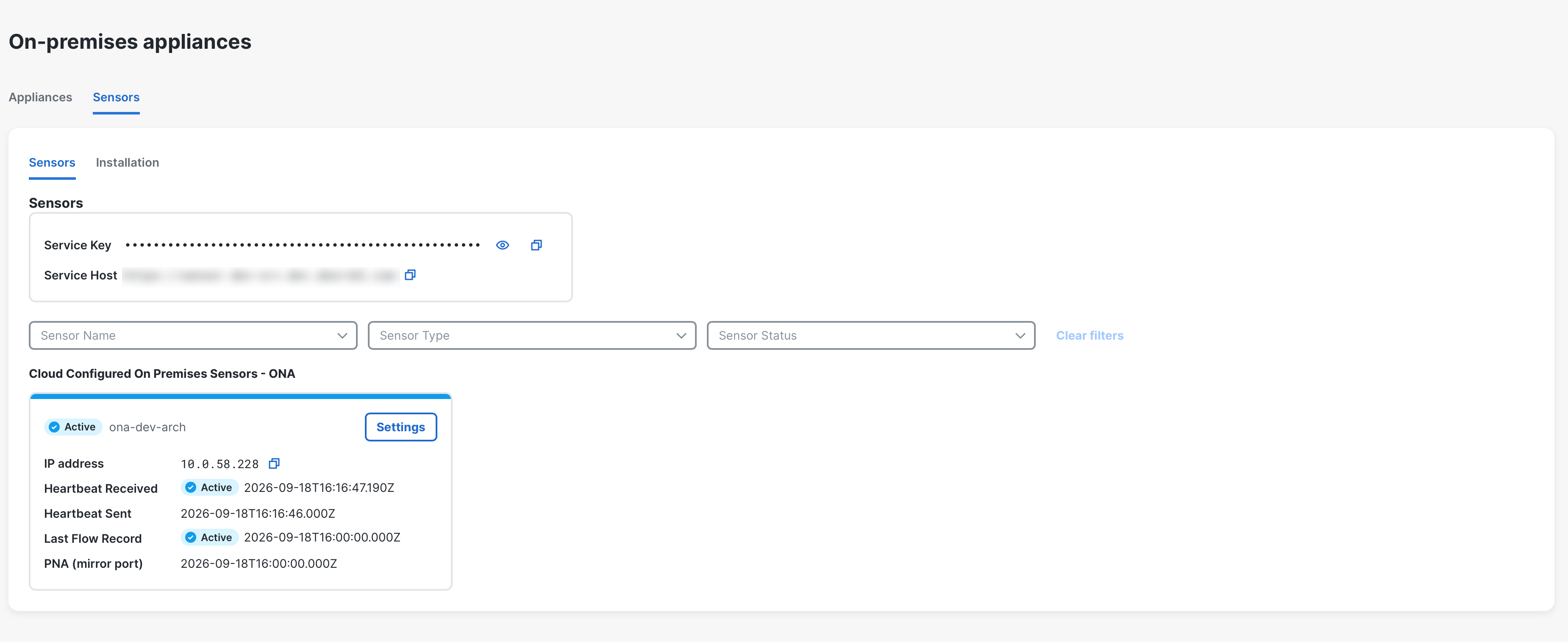
 Configure Sensors
Once a sensor is installed, it will need to be linked to Cisco XDR. This is done by manually linking the sensor to Cisco XDR using its unique service key.
The sensor can connect to the following portals:
-
https://sensor.anz-prod.obsrvbl.com (Australia)
Note: If you are using proxy server, complete the steps in the Configure Proxy section to enable communication between the sensor and Cisco XDR.
Add Cisco XDR’s Service Key to a Sensor
You can edit a sensor’s config.local configuration file to manually add a portal’s service key to associate the sensor with the portal.
-
Log in to Cisco XDR as an administrator.
-
Choose Administration > On-Premises Appliances from the navigation menu and click the Sensors tab.
-
In the Service Key field, click the
 (Copy) icon to copy the service key.
-
SSH into the sensor as an administrator.
- At the command prompt, enter this command:
sudo nano /opt/obsrvbl-ona/config.localand press Enter to edit the configuration file. -
Add the following lines, replacing
<service-key>with the Cisco XDR’s service key and<service_host_url>with your regional service host URL:# Service KeyOBSRVBL_SERVICE_KEY="<service-key>"OBSRVBL_HOST="<service_host_url>"Note: In Cisco XDR, go to Administration > On-Premises Appliances > Sensors to find your service host URL.
See the following image for an example:

- Press Ctrl + 0 to save the changes.
- Press Ctrl + x to exit.
- At the command prompt, enter
sudo service obsrvbl-ona restartto restart the Cisco XDR service.
Note: It can take up to 20 minutes before a new sensor is reflected in Cisco XDR.
Configure Proxy
If you are using proxy server, complete the following steps to enable communication between the sensor and Cisco XDR.
-
SSH into the sensor as an administrator.
- At the command prompt, enter this command:
sudo nano /opt/obsrvbl-ona/config.localand press Enter to edit the configuration file. - Add the following line, replacing
proxy.name.comwith your proxy server's hostname or IP address andPortwith your proxy server's port number:HTTPS_PROXY="proxy.name.com:Port"
- Press Ctrl + 0 to save the changes.
- Press Ctrl + x to exit.
- At the command prompt, enter
sudo service obsrvbl-ona restartto restart the Cisco XDR service.
Note: It can take up to 20 minutes before a new sensor is reflected in Cisco XDR.
Confirm a Sensor Connection
After a sensor is added to the portal, confirm the connection in Cisco XDR.
Note: If you manually linked a sensor to the Cisco XDR by updating the config.local configuration file using a service key, using the curl command to confirm the connection from the sensor may not return the web portal name.
- Log in to Cisco XDR.
-
Choose Administration > On-Premises Appliances from the navigation menu and click the Sensors tab. The sensor appears in the Sensors tab.
You can narrow the display of the sensors based on the sensor name, type, and status using the Sensor Name, Sensor Type, and Sensor Status drop-down lists.
If you do not see the sensor in the Sensors tab, do the following to log into the sensor to confirm the connection:
-
SSH into the sensor as an administrator.
-
At the command prompt, enter
curl https://sensor.ext.obsrvbl.comand press Enter. The sensor returns the Cisco XDR name. See the following image for an example.
Note: Your service host URL may be different based on your location. Go to the Sensors tab in Cisco XDR to find your service host URL.
-
Log out of the sensor.
Configure a Sensor to Collect Flow Data
A sensor creates flow records from the traffic on its Ethernet interfaces by default. This default configuration assumes that the sensor is attached to a SPAN or mirror Ethernet port. If other devices on your network can generate flow records, you can configure the sensor in the web portal UI to collect flow records from these sources and send them to the cloud.
If the network devices generate different types of flows it is recommended to configure the sensor to collect each type over a different UDP port. This also makes troubleshooting easier. By default, the local sensor firewall (iptables) has ports 2055/UDP, 4739/UDP, and 9995/UDP open. If you want to use additional UDP ports, you must configure them in the web portal.
You can configure collection of the following flow types in the web portal UI:
- NetFlow v5 - Port 2055/UDP (open by default)
- NetFlow v9 - Port 9995/UDP (open by default)
- IPFIX - Port 4739/UDP (open by default)
- sFlow - Port 6343/UDP
Note: We have provided the default ports, but these can be configured to your preferred ports in the web portal UI.
Certain network appliances must be selected in Cisco XDR before they will work properly:
- Cisco Meraki - Port 9998/UDP
- Cisco ASA - Port 9997/UDP
- SonicWALL - Port 9999/UDP
Note: Meraki firmware version 14.50 aligns Meraki log export format with NetFlow format. If your Meraki device runs firmware version 14.50 or greater, configure your sensor with a Probe Type of NetFlow v9 and a Source of Standard. If your Meraki device runs a firmware version older than 14.50, configure your sensor with a Probe Type of NetFlow v9 and a Source of Meraki MX (below ver. 14.50).
Add a Probe
-
Log in to Cisco XDR as an administrator.
-
Choose Administration > On-Premises Appliances from the navigation menu and click the Sensors tab.
-
Click Settings in the sensor card you added.
-
In the NetFlow/IPFIX area, click Add probe.

Note: This option requires an up-to-date sensor version. If you do not see this option, click the Installation tab in the Sensors tab to download a current version of the sensor ISO.
-
Choose a flow type from the Probe type drop-down menu.
-
Enter a port number in the Port field.
Note: If you want to pass Enhanced NetFlow to your sensor, ensure that the UDP port you configure is not one that is also configured for Flexible NetFlow or IPFIX in your sensor configuration. For example, configure port 2055/UDP for Enhanced NetFlow, and port 9995/UDP for Flexible NetFlow. See Enhanced NetFlow for more information.
-
Choose a protocol (TCP or UDP) from the Protocol drop-down menu.
-
Choose the network appliance from the Source drop-down menu.
-
Click Save.
In the NetFlow/IPFIX table, you can click the
 (Edit) icon to make changes to the probe settings or click the
  (Delete) icon to remove the probe from the table. To keep the settings but disable the probe, click the Enabled toggle to off.
Note: It can take up to 30 minutes for sensor configuration updates to be reflected in Cisco XDR.
Edit Sensor Display Label
In Cisco XDR, you can configure a sensor's display label.
-
Choose Administration > On-Premises Appliances from the navigation menu and click the Sensors tab.
-
Click Settings in the sensor card you want to edit.
-
In the Rename sensor area, edit the sensor name in the Label field.
-
Click Apply.
Configure a Sensor's Monitoring Settings
In Cisco XDR, you can configure which subnets a sensor monitors, and if you use passive DNS, how many packets per second to capture. Removing a subnet range from the sensor's configuration instructs the sensor to ignore packets that are sourced from that subnet.
Confusion arises as to why a device may be created for an IP address that is not listed in the monitored networks on the sensor. This is because a device that is listed on the monitored ranges has communicated with a non-listed range.
For example, consider a sensor that is configured to monitor only the 192.168.0.0/24 range. The system considers any IP address that transmits traffic in that range to be a device. In addition, if a device in the 192.168.0.0/24 range is observed communicating with an IP address in the 10.0.0.0/8 range, the sensor will monitor that traffic, as 192.168.0.0/24 is considered a monitored range. The system also creates a device for the other IP address in the unmonitored 10.0.0.0/8 range because:
- the
10.0.0.0/8range is part of the RFC 1918 space, and - the IP address from that range was observed communicating with a monitored IP address.
If the 10.0.0.0/8 range was not defined for monitoring by the sensor, and two Ip addresses in the 10.0.0.0/8 subnet only communicate with each other, neither would be considered a device, as neither had directly communicated with a defined subnet.
-
Choose Administration > On-Premises Appliances from the navigation menu and click the Sensors tab.
-
Click Settings in the sensor card you want to edit.
-
Click the Enable PNA service toggle to on to enable the private network access service.
-
In the Monitoring area, add one or more CIDR blocks in the Networks field, one per line.
-
Click Apply.