About Cisco XDR
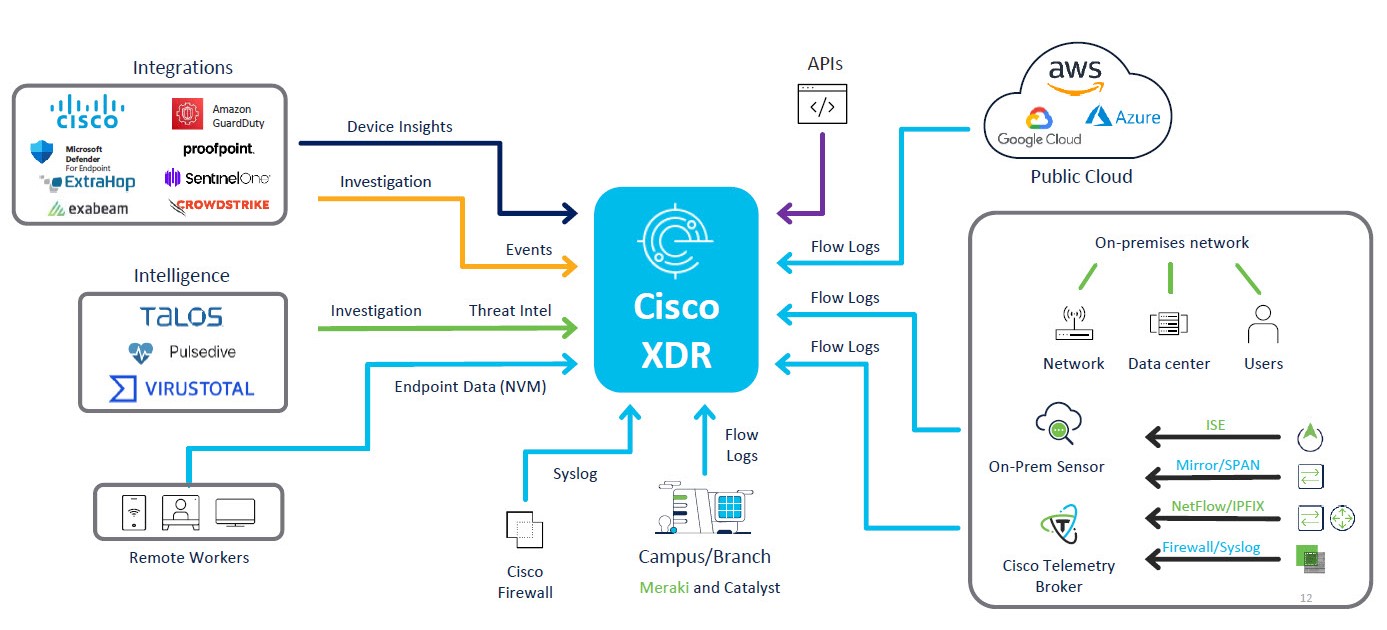
Cisco XDR is a cloud-based solution designed to simplify security operations and empower security teams to detect, prioritize, and respond to sophisticated threats. By integrating both Cisco and third-party security solutions into a unified platform, Cisco XDR offers a comprehensive approach to threat management.
Integrated with the threat intelligence provided by Talos, Cisco XDR enriches incident data with additional context and asset insights, reducing false positives and enhancing overall threat detection, response, and forensic capabilities. This solution not only prioritizes alerts to ensure that critical issues are addressed promptly but also provides the shortest path from detection to response, thereby optimizing security operations.
The extensive integration capabilities of Cisco XDR—supporting over 80 integrations with new ones continually being added—allow organizations to tailor their security environments to meet specific needs. This flexibility enhances the scope of security operations, making it easier to manage and secure complex environments.
The diagram below illustrates how Cisco XDR integrates various data sources to provide a holistic security solution:
 Core Capabilities of Cisco XDR
Cisco XDR delivers comprehensive threat protection through the following core capabilities:
-
Early Detection - Cisco XDR enables security teams to detect threats sooner by assessing vulnerabilities and risk factors within the environment. Early detection is crucial for maintaining robust security measures and preventing potential breaches.
-
Prioritization by Impact - The solution prioritizes alerts based on their potential impact, ensuring that security teams focus on the most critical issues. This targeted approach helps allocate resources more effectively and addresses high-risk threats with urgency.
-
Reduced Investigation Time - With advanced tools for investigation, Cisco XDR significantly reduces the Mean Time to Resolution (MTTR). This allows security professionals to quickly understand and isolate alerts, minimizing the time between detection and remediation.
-
Accelerated Response - Cisco XDR facilitates a more confident and rapid response to threats by leveraging automation to streamline remediation processes. This enables security teams to respond faster and more effectively to incidents.
-
Extended Asset Context - Cisco XDR provides comprehensive visibility into all assets within the environment, reliably identifying users and assessing the security posture of each device. By contextualizing assets and customizing asset values and labels, security teams gain the necessary context for impact analysis. This extended visibility is essential for maintaining a secure and well-monitored network.
Understanding Cisco XDR Incidents, Detections, and Activities
Cisco XDR organizes related telemetry using the following key elements:
-
Incidents
-
Detections
-
Activities
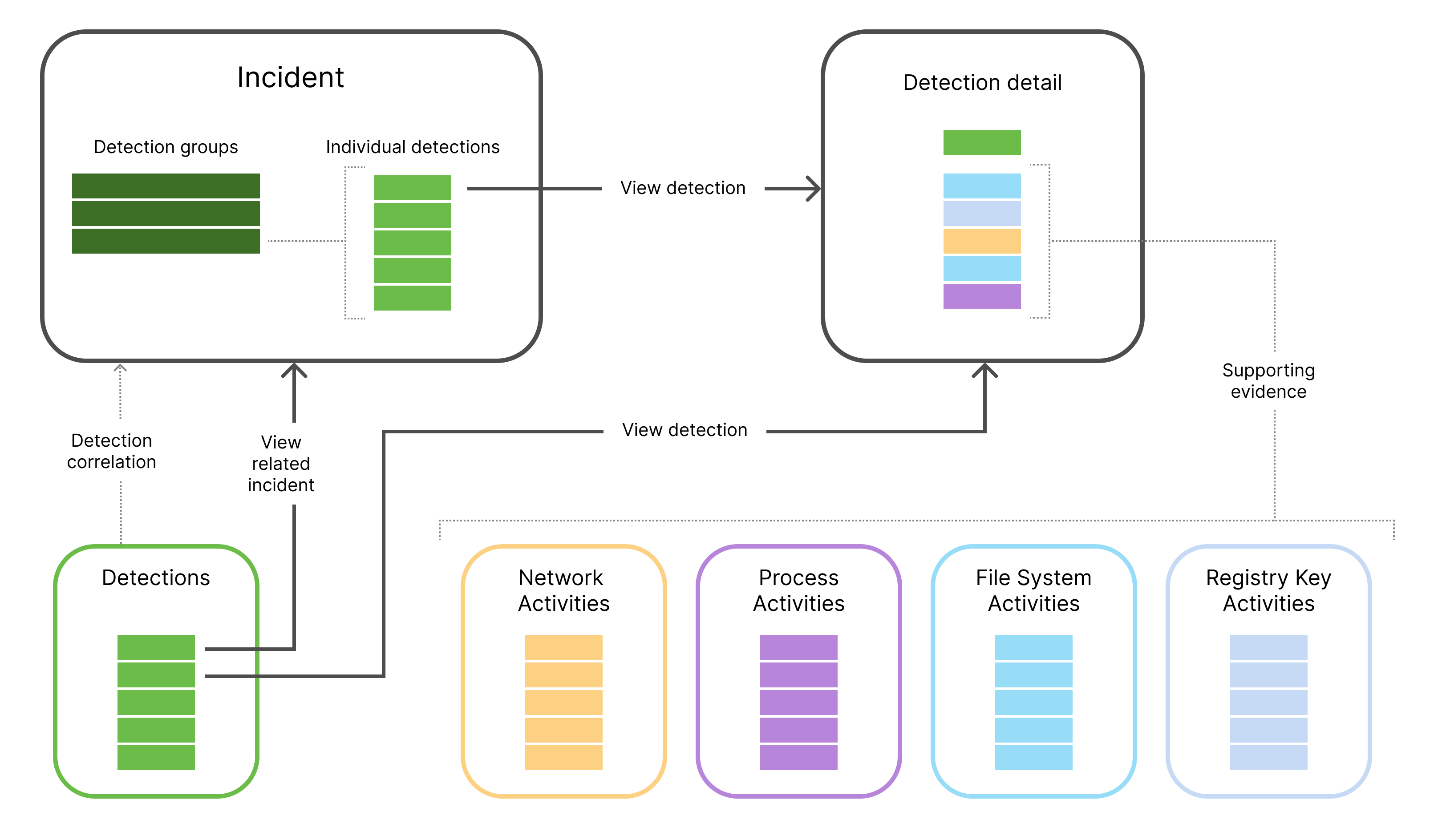
This section provides a definition for each of the elements, how they relate to each other, and where they appear in the UI. The following diagram shows the incidents, detections, and activities in the context of an incident:
Incidents
An incident is a group of correlated detections that are prioritized for security specialists to provide the starting point for analysis.
When exploring an incident of interest, it is often useful to view its correlated detections.
To view incidents, choose Incidents from the left navigation menu. For more information, see Incidents.
Detections
Detections are security events identified by Cisco XDR or your integrated detection sources. Not all detections become part of an incident, but they can be viewed and searched regardless.
In an incident, similar detections are grouped to expedite analysis. Individual detections can be viewed in detail within each group.
Most detections include supporting evidence in the form of related activities.
For more information, see Detections.
View Detections in an Incident
To view detections in an incident:
-
In the left navigation menu, click Incidents.
-
Click the incident name on the Incidents page to open the incident drawer.
-
In the incident drawer, click View Incident Detail to open the Incident Detail page.
-
Click the Detection tab. The groups of detections that were correlated to trigger this incident are displayed.
Alternatively, you can click Launch new incident view to view the detections in the Detections panel under Analysis in the left pane.
View All Detections
To view all detections (not just those included in incidents), navigate to Incidents > Detections from the left navigation menu.
Activities
Activities are telemetry from integrated data sources, standardized into a common format for analysis and detection.
There are different types of activities, such as:
-
Network activities
-
Process activities
-
File system activities
-
Registry key activities
-
Authentication activities, and other activity types
Activities accompany most detections, providing supporting evidence. These activities can be seen on the detection details page.
Cisco XDR analyzes activities to identify suspicious behavior and generate detections. Not all activities are associated with a detection. Network activities are listed on the Activities page.
For more information, see Activities.
View Activities in an Incident
To view activities within a detection in an incident:
-
In the left navigation menu, click Incidents.
-
Click an incident name on the Incidents page to open the incident drawer.
-
In the incident drawer, click View Incident Detail to open the Incident Detail page.
-
Click Launch new incident view.
-
Expand the Detections panel under Analysis in the left pane.
-
In a detection group, click View details.
-
Click a detection in the Related detections area. The detection details page is displayed with the supporting activities listed in the Activities area.
View Activities in a Detection
To view activities within an individual detection:
-
In the left navigation menu, click Incidents > Detections.
-
Click a detection name on the Detections page to open a detection drawer.
-
In the detection drawer, click View details to open the detection details page with the supporting activities in the Activities area.
View All Activities
To see all activities (not just those included in detections), choose Investigate > Activities in the left navigation menu.
Supported Browsers
Cisco XDR is supported on the latest version and one prior version of the following browsers:
- Google Chrome™
- Microsoft Edge®
- Mozilla Firefox®
- Apple® Safari®
IPv6 Support
Cisco XDR offers partial IPv6 support, with certain features leveraging IPv6 while others remain IPv4-dependent. Support varies based on functionality, ensuring seamless performance while we continue expanding IPv6 capabilities.
To see where IPv6 is currently supported, go to https://docs.xdr.security.cisco.com/Content/Search.htm?q=ipv6.